Contact Details
Social (optional)
Customize
details above
Who Uses vCard QR Codes
Professionals
Replace paper business cards. Print your QR on your card and contacts save your details with one scan.
Events & Networking
Speed networking sessions. Show your QR code instead of fumbling with cards or typing numbers.
Shops & Services
Post your vCard QR at your counter. Customers save your contact for future orders.
Which fields map to which vCard properties
The page writes vCard 3.0, the format defined in RFC 2426, starting with BEGIN:VCARD and VERSION:3.0 and ending with END:VCARD. Empty fields are left out. A first or last name is required, because the RFC says N and FN must be present.
| Field on this page | vCard property written | Example line |
|---|---|---|
| First name, Last name | N (family name; given name) and FN (full name) | N:Tan;Alex;;; and FN:Alex Tan |
| Company | ORG | ORG:Example Pte Ltd |
| Job title | TITLE | TITLE:Operations Manager |
| Phone (work) | TEL;TYPE=WORK,VOICE | TEL;TYPE=WORK,VOICE:+65 6000 0001 |
| Phone (mobile) | TEL;TYPE=CELL | TEL;TYPE=CELL:+65 6000 0000 |
EMAIL | EMAIL:alex@example.com | |
| Website | URL | URL:https://example.com |
| Address | ADR;TYPE=WORK, whole address in the street part | ADR;TYPE=WORK:;;1 Example Road\, Singapore 000000;;;; |
| LinkedIn, Twitter / X | X-SOCIALPROFILE;TYPE=linkedin and TYPE=twitter | X-SOCIALPROFILE;TYPE=linkedin:https://www.linkedin.com/in/example |
Three details worth knowing. Commas, semicolons and line breaks in your text are escaped with a backslash, as the RFC requires, but a backslash itself is not escaped. The address goes into the street part of ADR as one piece rather than being split into city, region and postal code. And X-SOCIALPROFILE is not defined in RFC 2426: the RFC allows properties starting with X- as non-standard extensions that two programs agree on between themselves, so whether a contacts app uses them is up to that app.
Each field makes the code denser
We filled the fields on this page one at a time with sample data and read each code back with an automated decoder. With a name only, the code was 37 modules across; with all eleven fields it was 77, so at the default 256 px each module shrank from 6.92 px to 3.32 px. Every step decoded in software, but smaller modules leave a phone less room for blur and glare. The page shows a warning once the vCard passes 500 characters.
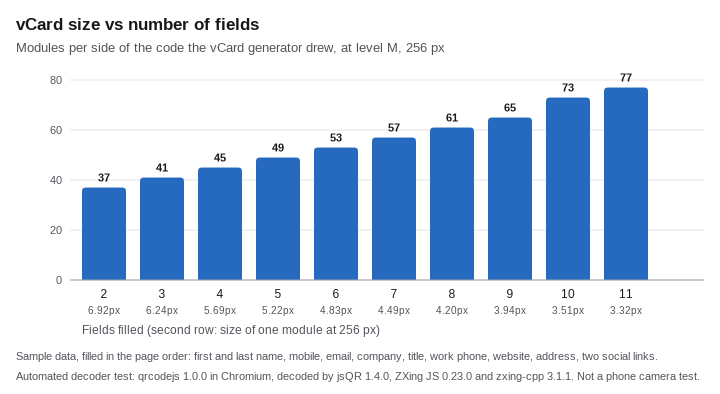
If the code has to work small, for example on a business card, keep to the fields people actually need and size it with our print size table. The PNG has no white margin of its own, so leave clear space around it.