How We Test QR Codes
The figures on this site about quiet zones, contrast, logos and code density come from one automated test. A script makes QR codes with the same library our generator uses, then asks three software decoders to read them. This page says exactly what was run, what it found, and what it cannot tell you. How articles are written, checked and corrected is set out in our editorial policy.
What the test is
- Generator: qrcodejs 1.0.0, the same file our pages load from cdnjs (sha256
c541ef06327885a8415bca8df6071e14189b4855336def4f36db54bde8484f36, byte-identical to the npm package of that version). It runs inside headless Chromium 148.0.7778.96, driven by Playwright 1.65.0, so the codes are drawn on a browser canvas the way our generator draws them. - Decoders: jsQR 1.4.0 (its default setting, which also tries an inverted image), ZXing JS (
@zxing/library0.23.0, with the TRY_HARDER hint) and zxing-cpp 3.1.1 (Python bindings, default options). They are independent implementations. - Payloads: ten different addresses on
example.com, a domain reserved for examples, per condition, so each result is a count out of 10. A pass means the decoder returned exactly the encoded text. - Defaults unless a test changes them: error correction M, 256 px, black on white, four modules of quiet zone. 1,090 trials in total.
What it does not show
Every image in the test is a clean digital image read straight from memory. That leaves out most of what goes wrong in real life:
- A software decoder is not a phone camera. No camera app, autofocus, exposure or motion was involved.
- Nothing was printed. Paper, ink spread, print resolution and lamination were not tested.
- Glare, lighting, scanning distance and viewing angle were not tested. Rotation and blur were applied in software.
- The "logo" is a solid coloured square. Real logos with detail behave differently.
So read a pass as "a decoder can read this image under ideal conditions", never as "this will scan on a phone". A fail is more informative: if a code fails here, a phone has little to work with.
What it found
Quiet zone
On a plain white image, all three decoders read every code at quiet zones of 0, 1, 2 and 4 modules, at every error correction level (160 of 160). With nothing around it, the edge of the image acts as a margin. When random dark and light squares were placed right outside the margin, standing in for artwork printed up to the code, no decoder read any code with a 0 module margin, and all three read every code with 1, 2 or 4 modules.
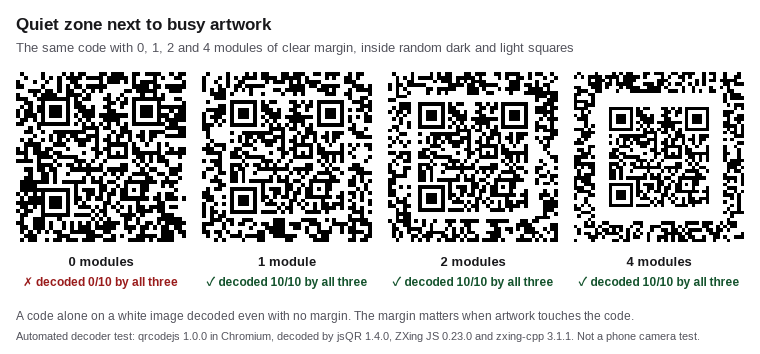
The standard asks for four modules. The test only shows that some margin was needed once artwork touched the code; it does not show that one module is enough on paper.
Contrast
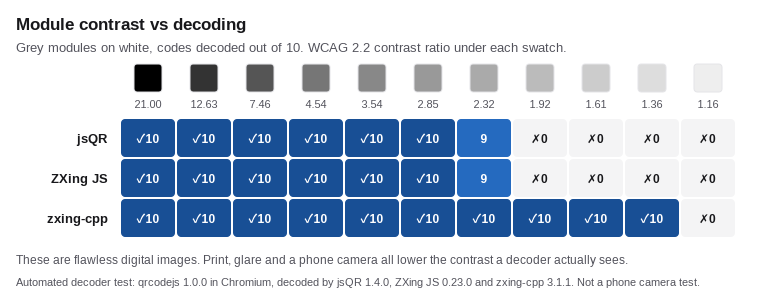
The decoders disagree a lot here, and all of them read contrast far lower than you should print. A camera sees less contrast than the file contains, so keep codes dark on light, as our print design guide advises.
Inverted codes
White modules on black: jsQR read 10 of 10 with its inversion pass and 0 of 10 with it turned off. ZXing JS read 0 of 10. zxing-cpp read 10 of 10. Whether an inverted code works depends on the reader, which is why the guides here say to keep codes dark on light.
Logo coverage
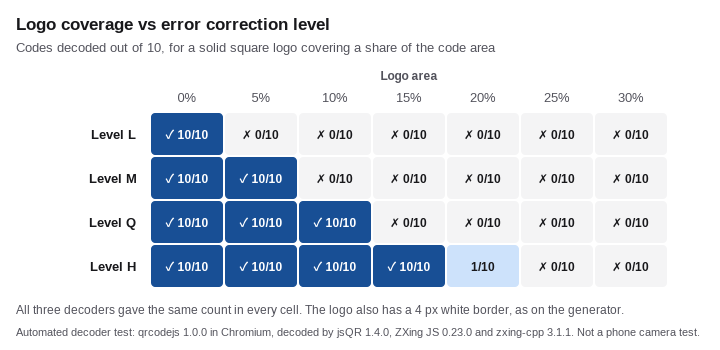
Our generator's logo slider sets the logo's width at 10 to 30 percent of the code's width, which covers roughly 1 to 9 percent of the area before its white border, and it switches the level to H when you add a logo. In this test, level H read every code up to 15 percent of the area. The common claim that level H tolerates 30 percent damage did not hold for a centred logo: at 25 and 30 percent nothing decoded.
Size, blur and rotation
Every code decoded at every output size the generator offers (128 to 512 px), when shrunk to as little as 1 px per module, with a canvas blur of up to 3 px, and rotated up to 45 degrees. These are easy cases for software on a clean image and say little about a phone at arm's length.
Longer URLs
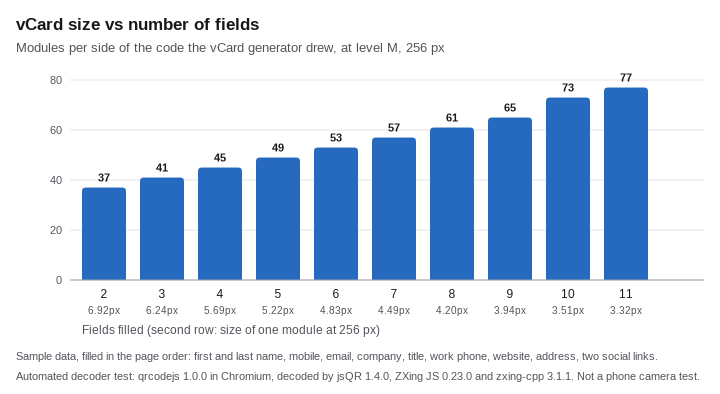
Longer text means more modules and smaller ones at the same size. At 256 px, a 23 character URL made a version 2 to 4 code with modules of about 8 to 10 px; a 640 character URL made a version 17 to 28 code with modules of about 2 to 3 px. jsQR and ZXing JS failed every code at versions 17, 24 and 28 at that size, while zxing-cpp read them all. ZXing JS also missed 1 or 2 of 10 at several smaller versions.
To check whether those failures came from our generator or from the decoders, every version the library produces was rendered at 8 px per module and compared with a second encoder, node-qrcode 1.5.4. For all 128 version and level combinations the two produced identical modules, and zxing-cpp read every one. jsQR missed one (version 23, level L) and ZXing JS missed 58, for both encoders equally. Those are decoder limits, not encoding errors.
vCard size
What it found about our own generator
- The homepage PNG has a quiet zone. The 9 November run found that the homepage PNG had no margin at all and that the Quiet Zone slider changed no pixel. The generator was fixed on 10 November 2026. In the rerun, both download buttons (the chosen size and 512 px) were tried at every slider setting from 0 to 4. The margin in each file matched the slider to within a pixel, the default is 4 modules, the preview matched the chosen size download pixel for pixel, the files were 3.3 to 8.3 KB, and jsQR, ZXing JS and zxing-cpp read all 10 files. The WiFi, vCard and batch generators still add no margin, so leave clear space around those codes in your layout.
- The WiFi generator now follows the ZXing wiki format. The 9 November run found that it did not escape colons, wrote an empty type for open networks and never quoted hex-like values. Since 10 November it escapes backslash, semicolon, comma, colon and double quote, wraps a value made only of 0 to 9 and A to F in double quotes, and writes
T:nopasswith no password field for an open network. In a rerun of 14 cases, including a password with each special character, a network name with all five, hex-like values and open networks, jsQR, ZXing JS and zxing-cpp each returned exactly the string the wiki rules give, and parsing it gave back the name and password typed in. This shows what the code holds, not how phones join the network. Details are on the WiFi generator page. - The WiFi page sent nothing after typing. In one automated run, the page made no network request at all after a test SSID and password were typed and the PNG was downloaded. You can check your own session with your browser's network tab, as the WiFi page explains.
The data
- Summary by condition (CSV): one row per setting with the count each decoder read.
- Every trial (CSV): 1,090 rows with the exact settings, image size, module size, contrast ratio and each decoder's result.
- Version check against node-qrcode (CSV)
- vCard size by field count (CSV)
- Run details (JSON): versions, library hash and run time.
Phone behaviour, such as how iPhones and Android phones handle WiFi codes for hidden or WPA3 networks, is not covered by this test. We will only publish results like that once they have been checked on real phones.